

Microsoft Dynamics 365 E-Invoicing Functions for the USA
Microsoft Dynamics UAE FTA E-Invoicing Complete User Guide
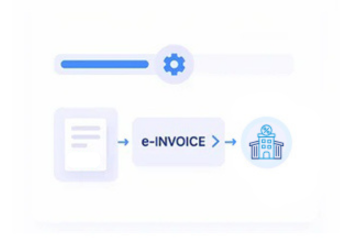
How Advintek Processes Dynamics 365 Invoice Data for the USA
- Source Transaction Collection: Retrieve billing, customer, item, payment, tax, currency, and accounting information from Microsoft Dynamics 365.
- Invoice Rule Validation: Check invoice numbers, dates, amounts, customer records, tax values, payment terms, and required transaction fields.
- Electronic Format Conversion: Organize Dynamics 365 billing information into structured invoice formats required by the selected U.S. trading partner or exchange method.
- Invoice Channel Delivery: Send prepared electronic invoices through configured customer portals, networks, APIs, or other supported exchange channels.
- Status Mapping: Link acknowledgements, confirmations, validations, rejections, and results to Dynamics 365 records.
What Microsoft Dynamics 365 Users Receive from Advintek in the USA
Advintek adds an external e-invoicing layer around Microsoft Dynamics 365 to organize billing data, prepare structured invoices, manage document exchange, track responses, and connect invoice activity with ERP records.
- Collects billing information from Dynamics 365
- Organizes customer and transaction references
- Handles configured U.S. electronic invoice formats
- Connects invoice statuses with ERP records
Why Dynamics 365 Users Adopt E-Invoicing in the USA
- Consistent Invoice Information: Arrange customer, transaction, item, payment, tax, and accounting fields before electronic invoice submission.
- Multi-Channel Invoice Delivery: Support configured electronic invoice exchange through customer systems, networks, APIs, portals, or service providers.
- Improved Transaction Traceability: Maintain relationships between electronic documents and the Dynamics 365 transactions that generated them.
- Clear Processing Statuses: Track accepted, delivered, rejected, pending, or exception-related invoice messages through the configured exchange process.
- Sales Tax Record Alignment: Keep applicable tax amounts and related invoice information associated with originating billing transactions.
- Credit Memo Coordination: Relate credit memos, invoice corrections, cancellations, and adjustments to corresponding ERP records for accurate review, reconciliation, reporting, and follow-up across electronic invoice processing activities.
Microsoft Dynamics 365 E-Invoicing Services for USA Businesses
Invoice Status Tracking
Track invoice preparation, submission, delivery, validation, rejection, and available status updates.
Trading Partner Connectivity
Connect invoices with configured customers, suppliers, networks, portals, and other trading partners.
Invoice Exception Review
Review incomplete data, transmission issues, rejected invoices, mismatches, and processing exceptions.
Built for Microsoft Dynamics 365 Users Across the USA
Businesses using Microsoft Dynamics 365 for distribution, manufacturing, wholesale, retail, professional services, construction, and other operations can connect their existing billing processes with structured electronic invoicing workflows.
- Maintain Existing Dynamics 365 Billing Processes
- Connect Customer Transactions With Electronic Documents
- Support Automated Recurring Invoice Workflows
- Relate Payments and Adjustments to Invoice Records
Connected USA Electronic Invoicing with Dynamics 365
Advintek connects Microsoft Dynamics 365 billing data with configured USA electronic invoicing workflows.
Connect Dynamics 365 with structured e-invoicing workflows for USA transactions today.
Ready e-Invoice System
FAQs About Microsoft Dynamics E-Invoicing in USA
How Does Dynamics 365 Support E-Invoicing in the USA?
Microsoft Dynamics 365 can provide the underlying customer, invoice, line-item, tax, payment, and accounting information used for electronic invoice processing. Advintek can connect these transaction records with configured e-invoicing workflows, helping prepare, validate, exchange, and track electronic invoice data without replacing core Dynamics 365 records.
Can Dynamics 365 E-Invoicing Support Different USA Trading Partners?
Yes. E-invoicing requirements and exchange methods can differ between customers, suppliers, business networks, portals, and service providers. Advintek can support configured invoice formats, connectivity methods, and trading-partner requirements while maintaining links between electronic documents and the originating Dynamics 365 transactions.
How Is Invoice Data Prepared for Electronic Submission?
Invoice information from Dynamics 365 can be reviewed and organized before electronic processing. Relevant customer details, invoice numbers, dates, line items, amounts, payment information, tax values, and accounting references can be mapped into the required structured electronic invoice format for the configured exchange workflow.
Can Businesses Track Dynamics 365 E-Invoice Processing Statuses?
Configured e-invoicing workflows can provide status information for invoice preparation, transmission, delivery, validation, rejection, or exceptions. Connecting these statuses with corresponding Dynamics 365 transactions can help finance teams identify documents requiring review and maintain a clearer relationship between source invoices and electronic processing activity.
What Does Advintek Provide for Dynamics 365 E-Invoicing?
Advintek supports the integration layer between Microsoft Dynamics 365 transaction data and configured electronic invoicing workflows. Services can include invoice data mapping, structured document preparation, connectivity configuration, status handling, exception review, and transaction traceability while keeping core Dynamics 365 financial records connected.