

USA E-Invoicing Integration for GEN10 ERP Environments
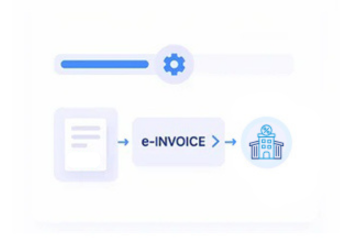
How Advintek Processes GEN10 ERP Invoices in the USA
- Transaction Data Collection: Gather relevant GEN10 ERP billing, customer, product, payment, and transaction information for electronic invoice preparation.
- Tax Information Validation: Review sales tax values, taxable amounts, invoice dates, customer details, and applicable transaction fields before processing.
- Invoice Format Preparation: Arrange GEN10 ERP records into configured electronic invoice structures required by connected business exchange workflows.
- Document Delivery Coordination: Manage configured invoice creation, exchange, delivery, acknowledgement, and response-handling stages across supported channels.
- Processing Status Tracking: Monitor invoice acknowledgements, delivery messages, rejected documents, exceptions, and processing outcomes for operational review.
What Advintek Can Process from GEN10 ERP for USA E-Invoicing
Advintek provides an external e-invoicing layer around GEN10 ERP, helping prepare billing records, organize sales tax data, exchange structured invoices, monitor processing activity, and link electronic business records with source transactions.
- Map Customer And Supplier Invoice Information
- Organize Sales Tax And Transaction Amounts
- Prepare Structured Electronic Invoice Documents
- Track Delivery Responses And Invoice Reconciliation
Why GEN10 ERP Users Connect Advintek for USA E-Invoicing
- Billing Data Mapping: Map GEN10 ERP customer, item, quantity, pricing, tax, payment, and invoice information into configured electronic document fields.
- Transaction Reference Matching: Associate electronic invoice documents with original GEN10 ERP orders, billing records, and transaction identifiers for accounting review.
- Sales Tax Review: Maintain relevant sales tax amounts, taxable values, jurisdictional details, and invoice references within configured electronic invoicing workflows.
- Exchange Activity Monitoring: Review invoice delivery, acknowledgements, processing messages, and document responses across connected electronic exchange channels.
- Payment Reference Association: Relate invoice records with applicable payment and receivable references to support financial reconciliation and transaction review.
- Exception Management: Identify incomplete records, rejected documents, mapping issues, and processing exceptions requiring correction before further invoice handling.
USA E-Invoicing Tools for GEN10 ERP Environments
Invoice Field Mapping
Map GEN10 ERP billing fields into configured electronic invoice structures for USA business processing.
Sales Tax
Review
Review sales tax amounts, taxable values, customer details, and transaction references before exchange.
Invoice Status Tracking
Track invoice creation, delivery, acknowledgement, rejection, and processing messages across workflows.
Designed for Businesses Using GEN10 ERP in the USA
Businesses using GEN10 ERP for accounting, billing, sales, purchasing, inventory, and receivables can connect their ERP transaction data with USA electronic invoicing processes for structured document exchange and reconciliation.
- Retain GEN10 ERP As Billing Source
- Prepare Structured Invoices For Electronic Exchange
- Organize Sales Tax Within Invoice Records
- Monitor Invoice Exchange And Response Details
Connect GEN10 ERP With USA E-Invoicing Today
Connect GEN10 ERP transaction data with structured electronic invoice processing for USA business workflows.
GEN10 ERP Connected. USA E-Invoicing Supported Through Advintek.
Ready e-Invoice System
FAQs About GEN10 ERP E-Invoicing in USA
Can GEN10 ERP connect with electronic invoicing workflows in the USA?
Yes. Advintek can connect applicable GEN10 ERP billing and transaction records with configured USA electronic invoicing workflows. Relevant customer, supplier, product, amount, sales tax, payment, and invoice information can be mapped into structured electronic documents for supported exchange and delivery processes.
Which GEN10 ERP records can be used for USA electronic invoices?
Depending on the configured workflow, Advintek can process relevant GEN10 ERP information such as customer records, supplier details, invoice numbers, product lines, quantities, prices, taxable amounts, sales tax, payment references, transaction dates, and other billing fields required for electronic invoice processing.
Does USA e-invoicing require sales tax information from GEN10 ERP?
Sales tax information may be relevant to electronic invoices depending on the transaction, jurisdiction, customer requirements, and configured business process. Advintek can organize applicable GEN10 ERP tax values, taxable amounts, jurisdictional information, and invoice references within the configured USA electronic invoicing workflow.
Can businesses continue using GEN10 ERP for accounting after connecting e-invoicing?
Yes. GEN10 ERP can continue serving as the source environment for billing, accounting, accounts receivable, purchasing, and related financial activities. Advintek can operate as an external electronic invoicing layer that receives selected transaction information for document preparation and exchange.
How does Advintek connect electronic invoices with GEN10 ERP transactions?
Advintek can associate processed electronic invoice records with relevant GEN10 ERP identifiers, invoice numbers, orders, billing references, and payment information. This relationship supports invoice lookup, transaction matching, receivable reconciliation, exception review, and comparison between source and exchanged documents.